
MySQL Schema Visualizer
1. Open your MySQL client (MySQL Workbench, DBeaver, or the MySQL CLI), connect to the database you want to visualize, and run this query:
SELECT JSON_OBJECT(
  'tables', (
    SELECT JSON_ARRAYAGG(
      JSON_OBJECT(
        'name',        t.TABLE_NAME,
        'columns', (
          SELECT JSON_ARRAYAGG(
            JSON_OBJECT(
              'name',      c.COLUMN_NAME,
              'type',      c.COLUMN_TYPE,
              'not_null',  (c.IS_NULLABLE = 'NO'),
              'extra',     c.EXTRA,
              'default',   c.COLUMN_DEFAULT,
              'comment',   c.COLUMN_COMMENT,
              'generated', c.GENERATION_EXPRESSION
            )
            ORDER BY c.ORDINAL_POSITION
          )
          FROM information_schema.COLUMNS c
          WHERE c.TABLE_SCHEMA = DATABASE()
            AND c.TABLE_NAME   = t.TABLE_NAME
        ),
        'primary_key', (
          SELECT JSON_ARRAYAGG(k.COLUMN_NAME ORDER BY k.ORDINAL_POSITION)
          FROM information_schema.KEY_COLUMN_USAGE k
          WHERE k.TABLE_SCHEMA    = DATABASE()
            AND k.TABLE_NAME      = t.TABLE_NAME
            AND k.CONSTRAINT_NAME = 'PRIMARY'
        ),
        'unique_keys', (
          SELECT JSON_ARRAYAGG(
            JSON_OBJECT('constraint', s.CONSTRAINT_NAME, 'column', s.COLUMN_NAME)
            ORDER BY s.CONSTRAINT_NAME, s.ORDINAL_POSITION
          )
          FROM information_schema.KEY_COLUMN_USAGE s
          JOIN information_schema.TABLE_CONSTRAINTS uc
            ON  uc.CONSTRAINT_NAME = s.CONSTRAINT_NAME
            AND uc.TABLE_SCHEMA    = s.TABLE_SCHEMA
            AND uc.TABLE_NAME      = s.TABLE_NAME
          WHERE s.TABLE_SCHEMA    = DATABASE()
            AND s.TABLE_NAME      = t.TABLE_NAME
            AND uc.CONSTRAINT_TYPE = 'UNIQUE'
        ),
        'checks', (
          SELECT JSON_ARRAYAGG(
            JSON_OBJECT('name', cc.CONSTRAINT_NAME, 'clause', cc.CHECK_CLAUSE)
          )
          FROM information_schema.TABLE_CONSTRAINTS tc
          JOIN information_schema.CHECK_CONSTRAINTS cc
            ON  cc.CONSTRAINT_SCHEMA = tc.CONSTRAINT_SCHEMA
            AND cc.CONSTRAINT_NAME   = tc.CONSTRAINT_NAME
          WHERE tc.TABLE_SCHEMA    = DATABASE()
            AND tc.TABLE_NAME      = t.TABLE_NAME
            AND tc.CONSTRAINT_TYPE = 'CHECK'
        )
      )
      ORDER BY t.TABLE_NAME
    )
    FROM information_schema.TABLES t
    WHERE t.TABLE_SCHEMA = DATABASE()
      AND t.TABLE_TYPE   = 'BASE TABLE'
  ),
  'foreign_keys', (
    SELECT JSON_ARRAYAGG(
      JSON_OBJECT(
        'constraint', kcu.CONSTRAINT_NAME,
        'table',      kcu.TABLE_NAME,
        'column',     kcu.COLUMN_NAME,
        'ref_table',  kcu.REFERENCED_TABLE_NAME,
        'ref_column', kcu.REFERENCED_COLUMN_NAME
      )
      ORDER BY kcu.CONSTRAINT_NAME, kcu.ORDINAL_POSITION
    )
    FROM information_schema.KEY_COLUMN_USAGE kcu
    JOIN information_schema.TABLE_CONSTRAINTS tc
      ON  tc.CONSTRAINT_NAME = kcu.CONSTRAINT_NAME
      AND tc.TABLE_SCHEMA    = kcu.TABLE_SCHEMA
      AND tc.TABLE_NAME      = kcu.TABLE_NAME
    WHERE kcu.TABLE_SCHEMA   = DATABASE()
      AND tc.CONSTRAINT_TYPE = 'FOREIGN KEY'
  )
) AS result;- Copy the result (right-click the cell → Copy), paste it below, and click Visualize Schema.
Requires MySQL 8.0.16+ (uses JSON_ARRAYAGG and CHECK_CONSTRAINTS)
For a cleaner result from a live database, use the "Query your DB" tab.
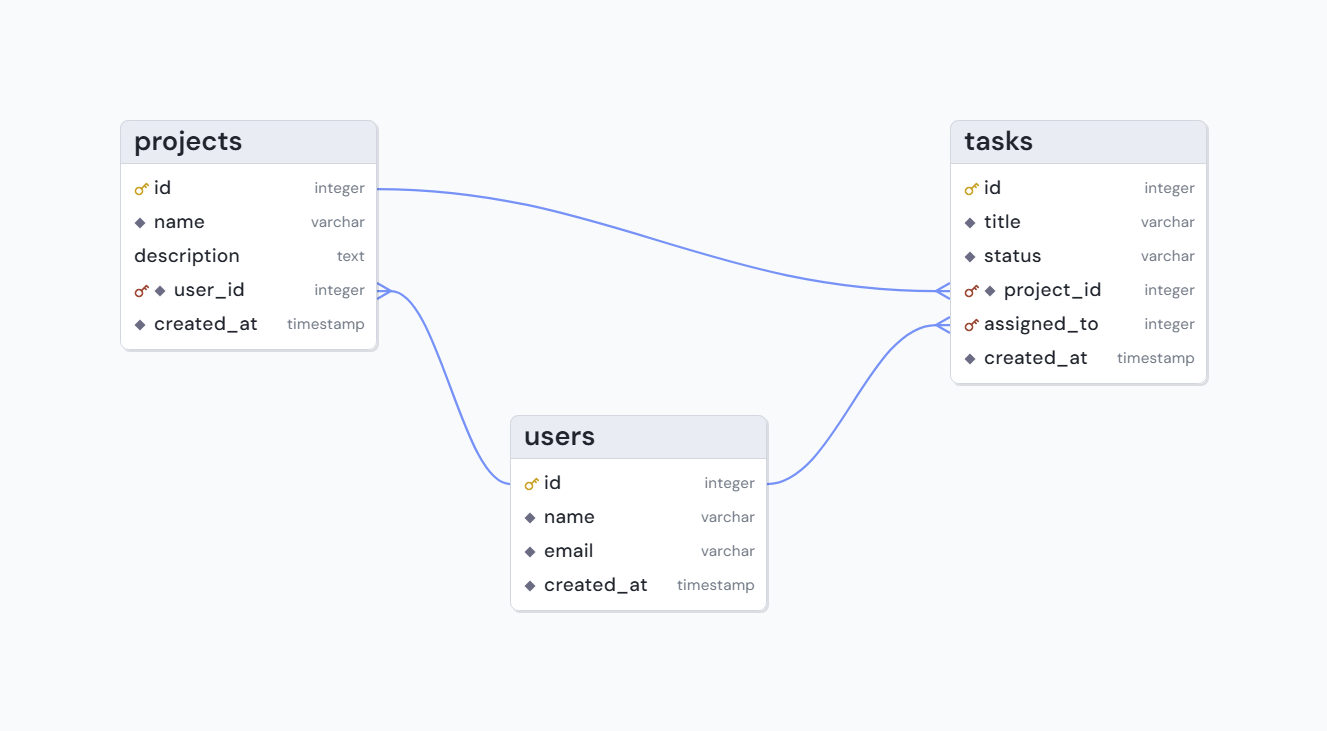
An example of a VibeSchema diagram
Free, no sign-up
VibeSchema is free to use. No account required.
Open Schema Editor
Design a schema from scratch with AI. Free, no sign-up.